To measure AI ROI, add up the value your AI tools create (mostly time saved, plus any cost savings or revenue they drive), subtract everything you spend on them, and divide by what you spend. The formula is simple. The hard part is getting honest inputs, especially how many licensed people actually use the tools and how much time they really save.
The gap between using AI and getting value from it is still wide. In McKinsey's 2026 State of AI survey, nearly nine in ten respondents said their organization regularly uses AI in at least one business function, but only 37% said AI has contributed to EBIT. Just 6% were "high performers" who attribute 5% or more of EBIT to AI (McKinsey, The state of AI in 2026; 1,719 participants surveyed from May 4 to June 8, 2026).
This guide gives you a simple AI ROI formula with a worked example, the metrics to track at each stage, and practical ways to raise the return once you can see it.
Use this formula:
AI ROI = (value created - total cost) / total cost
Where:
Count active users, not seats. A license nobody uses still costs money but creates no value, so adoption is the first input to measure.
Assumptions (examples only, replace them with your own numbers):
| Input | Value | Note |
|---|---|---|
| Seats | 1,000 | Example company size |
| License price | $30 per seat per month | Microsoft 365 Copilot enterprise add-on, paid yearly (Microsoft) |
| Rollout costs | $5,000 per month | Assumption: training and admin time |
| Active users in a typical month | 600 (60% of seats) | Assumption, measure this in your own data |
| Hours saved per active user per month | 3 | Assumption, test it against output data |
| Loaded hourly cost | $75 | Assumption: salary plus benefits and overhead |
Break-even check. With these numbers, each active user needs to save about 47 minutes a month ($35,000 / 600 active users / $75 an hour) for the program to pay for itself.
Sensitivity check. If only 300 people use the tool, value falls to $67,500 and ROI drops to about 93%. Adoption moves the result far more than the license price does.
Two lessons from the example:
You can model your own inputs with the Worklytics AI ROI calculator. For a tool-specific version of this formula, see our guide to GitHub Copilot ROI.
For business leaders, ROI is the language of value. Understanding the ROI of AI initiatives helps connect AI projects to real business goals and outcomes.
It also guides investment prioritization, spotlighting which AI use cases deliver the most value relative to their cost. In practice, demonstrating ROI can mean the difference between an AI pilot remaining a small experiment or scaling into a core part of the business.
When stakeholders see hard numbers – like improved operations or higher customer retention due to AI – they gain confidence to expand successful projects. Moreover, measuring ROI can support change management: employees are more likely to embrace AI tools when they see improvements in productivity or workload, easing concerns about new technologies.
In short, tracking ROI isn’t just an accounting exercise; it’s about ensuring AI adoption translates into measurable business value that everyone can rally behind.
Tracking ROI starts with defining the right metrics and data collection methods. You need to connect what the AI is doing (usage and performance) to outcomes that leadership cares about. The key is to link AI usage to productivity improvements and ultimately to business outcomes. Here are the core metrics and methods to consider:
Begin by measuring how extensively AI tools are used across the organization. Key indicators include the number of active users, frequency and duration of use, and feature utilization rates.
For example, tracking Daily Active Users (DAU) for each AI application helps distinguish one-time experimentation from consistent, habitual use.
These adoption metrics show whether the workforce is actually embracing AI tools.
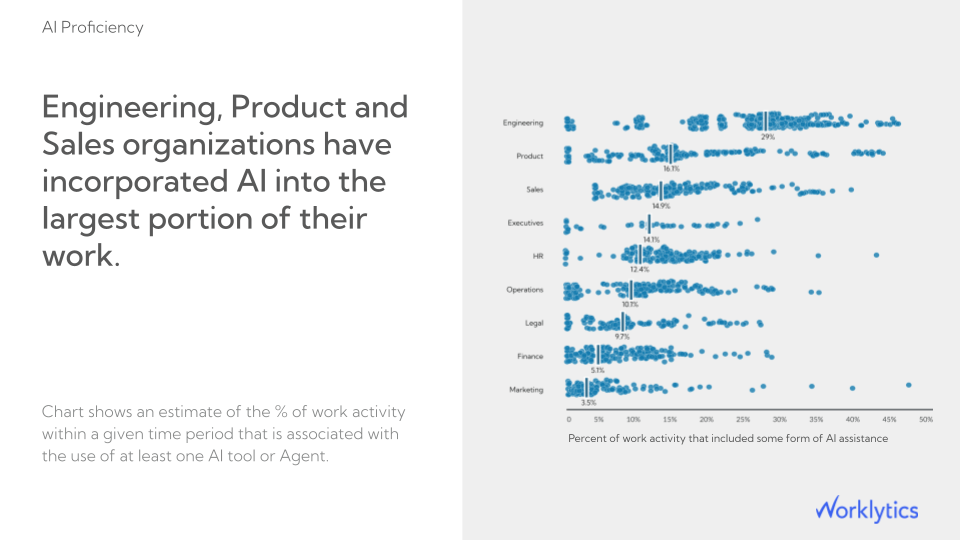
It’s also useful to segment usage data by team or role. You might find, for instance, that your engineering department heavily uses an AI coding assistant, whereas the sales team’s use of an AI CRM add-on is low. Such insights highlight where AI adoption is thriving or lagging, allowing targeted interventions. If ChatGPT is one of your main tools, our guide to building a ChatGPT usage dashboard shows which adoption metrics to put on it.
Next, connect AI usage to operational performance indicators. Ask how AI is changing the way work gets done. Time-based metrics are especially telling – for instance:
If an AI tool automates report generation, measure how much it cuts down preparation time. Error rates and quality metrics are relevant too – does the AI reduce mistakes in outputs (code errors, manual data entry errors, etc.)?
Early on, many of these improvements will appear as efficiency gains. Over time, these efficiency metrics should translate into more output (e.g., more code written, more sales calls made) or higher-quality work, which sets the stage for financial gains.
Finally, link these operational improvements to bottom-line results.
When assessing the business impact of an AI initiative, begin by identifying the Key Performance Indicators (KPIs) it is designed to improve. These serve as the foundation for tracking success over time. Focus on hard ROI metrics such as:
In addition to financial metrics, include employee-related indicators as part of your “soft ROI.” These capture the less tangible but equally important benefits of AI, such as:
Although these outcomes may not appear immediately in financial statements, they contribute significantly to long-term organizational performance and culture.
Finally, connect these measurements into a coherent narrative. Correlate AI usage and productivity data with business outcomes to show clear cause and effect. For example:
“AI tool X reduced processing time by 20%, allowing the team to complete two additional projects this quarter and increasing revenue by 5%.” (A hypothetical example.)
By establishing these links and tracking them consistently, you not only demonstrate ROI but also reveal how AI strengthens both short-term results and long-term organizational health.
Watch out for what’s called workslop: fake productivity that looks busy but creates little value. The goal is not to produce more content, but to create real outcomes. Always connect AI activity to results such as time saved, better quality, or faster delivery.
Tip: Start with a baseline. Before rolling out an AI solution, capture the numbers for your key metrics (e.g., average handle time, monthly sales, error rate) before AI deployment.
This baseline allows you to compare “before vs. after” and attribute improvements to the AI initiative.
Tracking metrics is only half the battle – the other half is optimizing your AI investments to maximize ROI. If your analysis shows less-than-stellar returns, it’s time to adjust strategy. Here are several best practices to help improve the ROI of your AI initiatives:
Focus on AI initiatives that directly support core business objectives like revenue growth, cost reduction, or improved customer experience. Identify clear use cases that address pain points or opportunities, and validate ideas with small pilots before scaling. Avoid projects that don’t clearly tie to measurable business outcomes.
AI ROI often suffers from hidden costs. Consider the full range of expenses, not only software licenses but also data preparation, infrastructure, employee training, and ongoing maintenance. Be aware and plan for these from the start, and reuse effective existing tools or platforms. Evaluate whether to build or buy, since third-party solutions can sometimes deliver faster, cheaper value. Careful cost control protects long-term ROI.
AI delivers value only when employees use it regularly and effectively. Build adoption through structured onboarding and continuous learning. Offer hands-on training sessions that show employees how AI fits into their daily workflows, such as how a sales representative can use AI to automate lead scoring or how a marketing team can use it to generate campaign reports.
Treat AI as a continuous process. Track performance against initial targets and adjust accordingly. If usage or outcomes are lower than expected, find out why and act on it. Improve training, adjust models, or refine the use case. Scale successful pilots and redirect resources from low-performing ones. Continuous review ensures lasting ROI.
Avoid expecting immediate, dramatic returns. Many AI projects take several quarters before the gains show up in business results. Not every time-saving will directly translate into extra output, and some benefits, such as quality improvements or better decision-making, take longer to show. Focus on both short-term efficiencies and long-term strategic value.
In summary:
Maximizing AI ROI means choosing the right projects, managing costs, ensuring adoption, iterating continuously, and taking a realistic, long-term view. When AI is aligned with strategy and integrated thoughtfully into workflows, its value compounds over time.
Worklytics measures AI adoption and usage across your AI tools in one view, so the "active users" and "depth of use" inputs in your ROI formula come from data rather than estimates. It works from tool metadata and admin APIs, aggregated and pseudonymized, and never reads the content of prompts or AI outputs.
Worklytics connects to AI tools such as Microsoft 365 Copilot, ChatGPT Enterprise, Claude, Gemini, GitHub Copilot, Cursor, Slack AI and Glean. It shows adoption by team and role, using your HR data for department breakdowns, so you can see where usage is strong and where it has stalled. Tracking these trends over time shows progress toward your adoption goals.
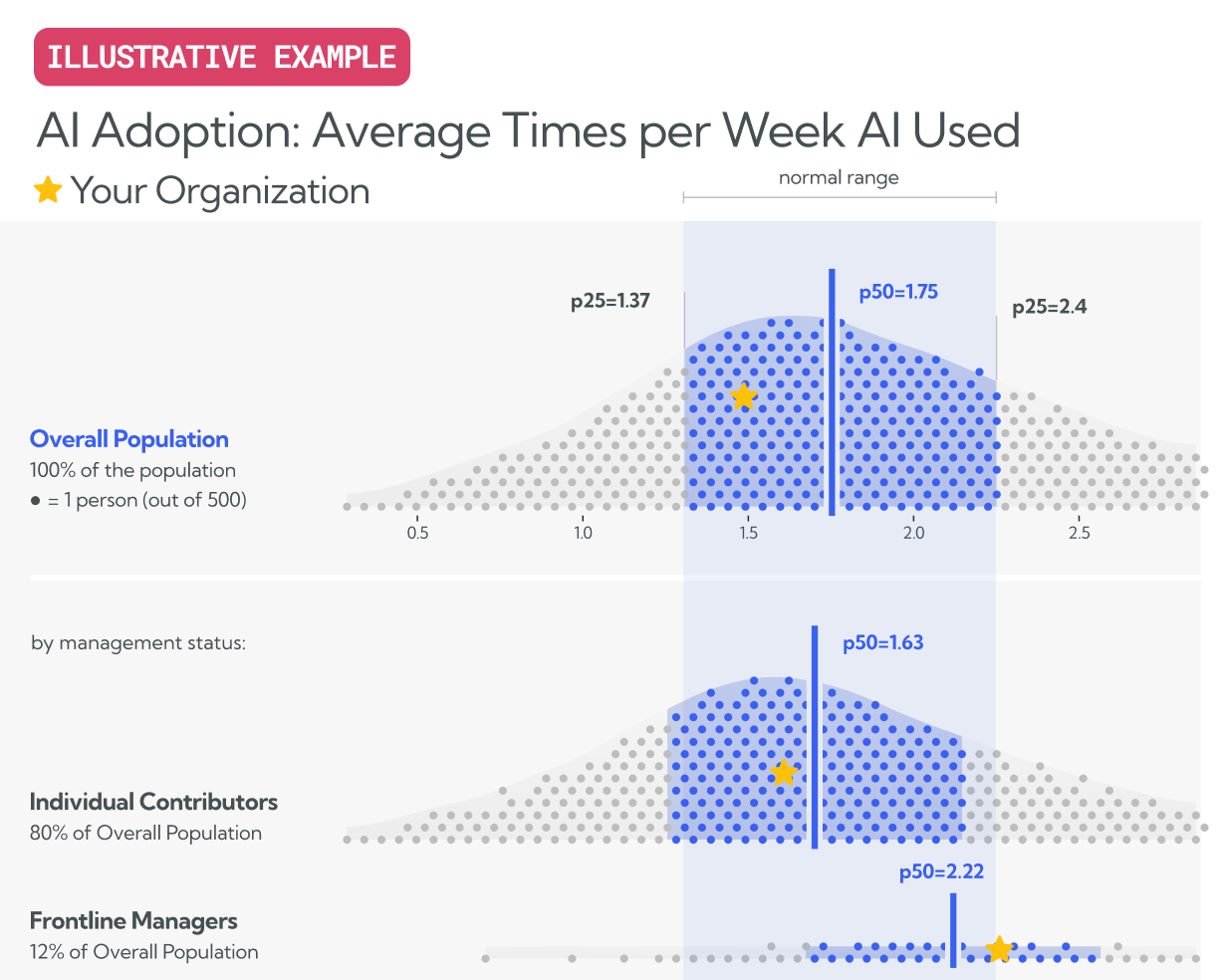
Activation alone does not create value. Worklytics shows how often people use each tool and how deeply, at the level each vendor's data allows. For example, it counts prompts and conversations in ChatGPT, interactions per app (Word, Excel, Teams and more) in Microsoft 365 Copilot, and sessions, tokens and estimated cost in Claude Code. Some tools, such as GitHub Copilot, only report adoption-level data (whether and when someone was active). For Microsoft Copilot, usage can also be grouped into work categories, so you can see which kinds of work AI is used for.
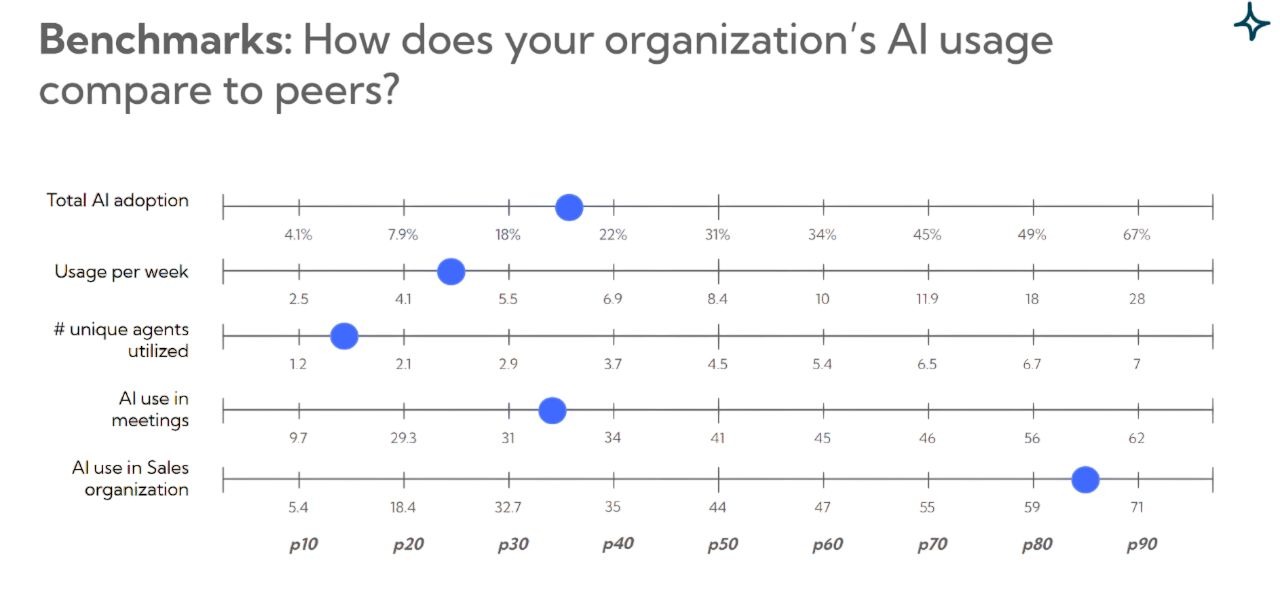
Peer benchmarking is available now in beta. It shows how your AI adoption compares with other organizations, which helps you set realistic adoption goals and explain your ROI results.
Worklytics shows which teams are lagging and where your power users are. Managers can focus training where it matters most and share what power users do with the teams that are behind.
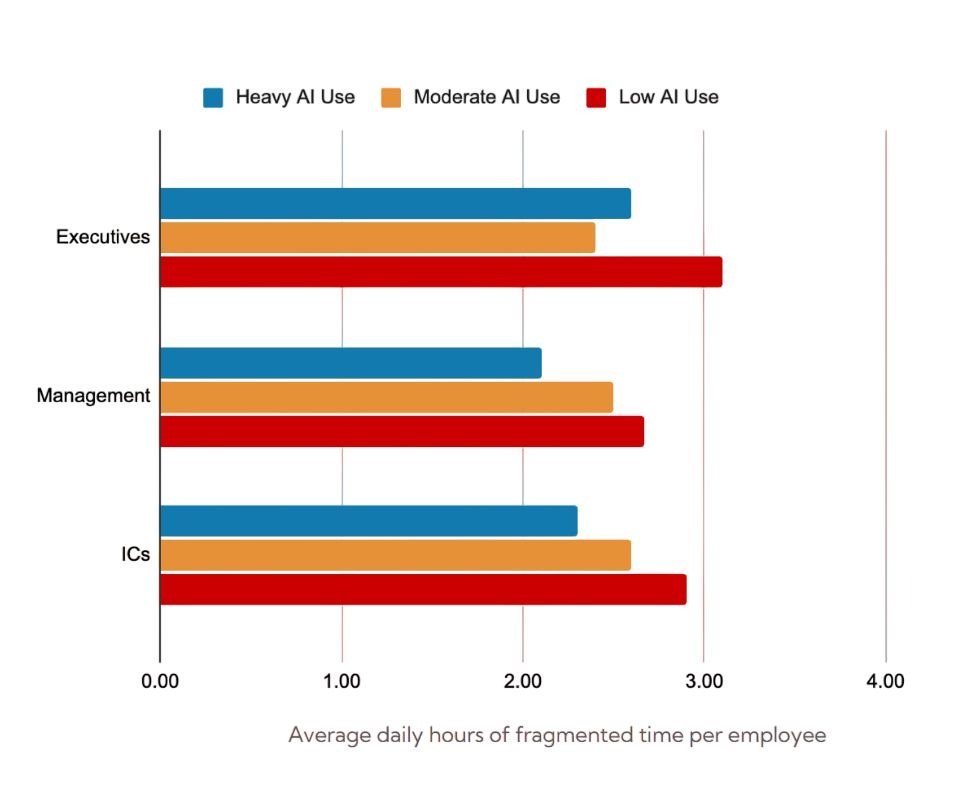
To connect usage with results, Worklytics compares output, throughput and collaboration patterns between high-adoption and low-adoption teams over the same period, combining AI usage data with calendar, email and project tool signals. You can also export the data to your own warehouse or BI tools and join it with your business KPIs.
Divide the value AI creates, minus its total cost, by its total cost. Value is usually active users times hours saved times loaded hourly cost, plus any measured cost savings or revenue. Total cost includes licenses, usage fees, training and admin time. Use active users rather than seats, and check time-saved estimates against output data.
Track three layers. Adoption metrics show who uses AI and how often (activation rate, weekly active users, power users). Productivity metrics show what changes in the work (task time, cycle time, quality). Business outcome metrics show the financial result (cost savings, revenue, customer satisfaction).
Use is widespread but measurable value is not. In McKinsey's 2026 State of AI survey, nearly nine in ten respondents said their organization regularly uses AI, but only 37% reported any EBIT contribution from it. Common causes are low active use of paid seats, no baseline before rollout, and time savings that never turn into more or better output.
Start with a baseline of how long key tasks take before rollout, then measure the same tasks after. Combine this with usage data so you know how many people actually use the tool and how often. Self-reported savings are a useful starting point but tend to be optimistic, so treat them as a range and confirm them against output data.
Adoption data is available within weeks, but business results usually take longer to show. License costs start on day one, so track active use early and act on low adoption quickly. Review ROI every quarter rather than expecting a single before and after number.
Worklytics shows how AI is actually used across your organization, team by team and tool by tool, so you can measure ROI with real adoption data instead of assumptions.
Discover how Worklytics can help you maximize ROI.