Not automatically. Field experiments show that AI tools mainly make individuals more capable: in a study of 776 Procter & Gamble professionals, one person working with AI matched the performance of a two-person team without it, and developers with GitHub Copilot did more work on their own and less coordinating with others.
That does not make AI bad for teamwork. The same studies show AI helping people cross functional silos and cutting time spent on email. But collaboration only improves when organizations change how teams work together, and the only way to know whether that is happening in your company is to measure collaboration and AI use side by side.
This post covers what the research says, how AI can help or hurt collaboration, and the metrics that show whether AI is changing how your teams work together.
Three large studies with real workers give the clearest picture so far.
In a pre-registered field experiment at Procter & Gamble, 776 professionals worked on real product innovation problems, alone or in pairs, with or without AI. Individuals with AI matched the performance of teams without AI. AI also helped break down functional silos: without AI, R&D staff leaned toward technical ideas and commercial staff toward commercial ones, while people using AI produced more balanced solutions (Dell'Acqua et al., NBER Working Paper 33641, 2025).
A Harvard Business School study of GitHub Copilot's rollout to open-source maintainers found that developers with access shifted their time toward coding and away from project management. The authors trace this to more autonomous rather than collaborative work, with larger effects for less experienced developers (Hoffmann et al., Harvard Business School Working Paper 25-021).
In a six-month field experiment across 66 firms and 7,137 knowledge workers, people who used an AI assistant built into their email, document and meeting apps spent about two fewer hours a week on email and less time working outside regular hours. The researchers did not detect wider changes in the quantity or mix of tasks from giving AI to individuals (Dillon et al., Shifting Work Patterns with Generative AI).
Today's AI tools make individuals faster and more self-sufficient. That can free time for better collaboration, or it can quietly reduce it. Which one happens depends on how teams decide to work, and it shows up in collaboration data before it shows up in surveys.
AI can make collaboration more effective by helping teams gather insights, organize information, and work faster. It can simplify research, automate repetitive tasks, and bring clarity to complex problems. When used well, AI allows teams to focus more on discussion, problem-solving, and decision-making rather than manual work.
However, AI should never replace real collaboration. If teams rely too heavily on it, they might skip valuable conversations, lose shared understanding, or limit diverse input. True teamwork happens when people exchange ideas, challenge perspectives, and make collective decisions.
AI should act as a supportive tool that strengthens how teams work together, not as a substitute for human connection. The goal is to combine AI’s efficiency with the empathy, communication, and shared thinking that only people can provide.
To truly realize the collaboration benefits of AI, companies should treat AI adoption as a strategic change initiative, not just an app installation. Here are some best practices and strategies to ensure AI tools become a positive force for teamwork:
Ultimately, making AI collaboration work is about intentional integration and iteration. The organizations that are seeing positive outcomes are those treating AI as a partner in process improvement: they pilot it, measure results, gather feedback, and refine how the team uses the tool. This continuous improvement loop, supported by data, is key to turning AI’s potential into real collaborative performance gains.
One of the hardest questions for leaders is whether new tools, including AI, are improving collaboration. Surveys and anecdotes rarely show how people actually work together. Worklytics answers it with data from the work tools your teams already use.
Worklytics connects to tools like email, calendars, Slack, Jira and GitHub and to the admin and usage APIs of AI tools. It analyzes metadata such as meeting length, response times and chat activity, never message content, to show how time is spent, how teams communicate and how AI use spreads across the organization. See how Worklytics measures AI adoption.
To see whether AI is changing teamwork, track AI use and collaboration for the same groups over the same weeks:
| Question | Worklytics metric |
|---|---|
| How deeply is AI part of the workday? | AI workflow penetration: the share of 15-minute blocks in the workday in which an AI tool was used |
| How regularly do people use AI? | AI days used per week, across all connected AI tools |
| Are teams still reaching across the organization? | Cross-group collaborators and cross-group collaboration % |
| Are close working relationships holding up? | Strong collaborators (people someone spends at least 2 hours a week with) |
| Is AI freeing time for collaboration or replacing it? | Collaborative work hours and % of work hours that are collaborative |
| Is saved time turning into focus? | Hours in focus blocks of 2 hours or more |
| Is AI work being shared? | Claude shared conversations and shared artifacts viewed, Claude projects used |
If AI workflow penetration rises while cross-group collaborators fall, AI may be replacing conversations that used to happen across teams. If it rises while focus hours and collaborative hours both hold steady or grow, AI is freeing time rather than isolating people.
For tool-level detail, see our guides to tracking ChatGPT use, tracking Claude Enterprise use and tracking Cursor use.
Worklytics can show when teams suffer from over-collaboration: too many meetings, messages or check-ins that leave no time to think. Meeting hours, meetings with large attendee lists, after-hours messages and fragmented time show when collaboration has crossed from helpful to overwhelming. With that data, leaders can reset collaboration norms so people have space to execute, not just communicate.
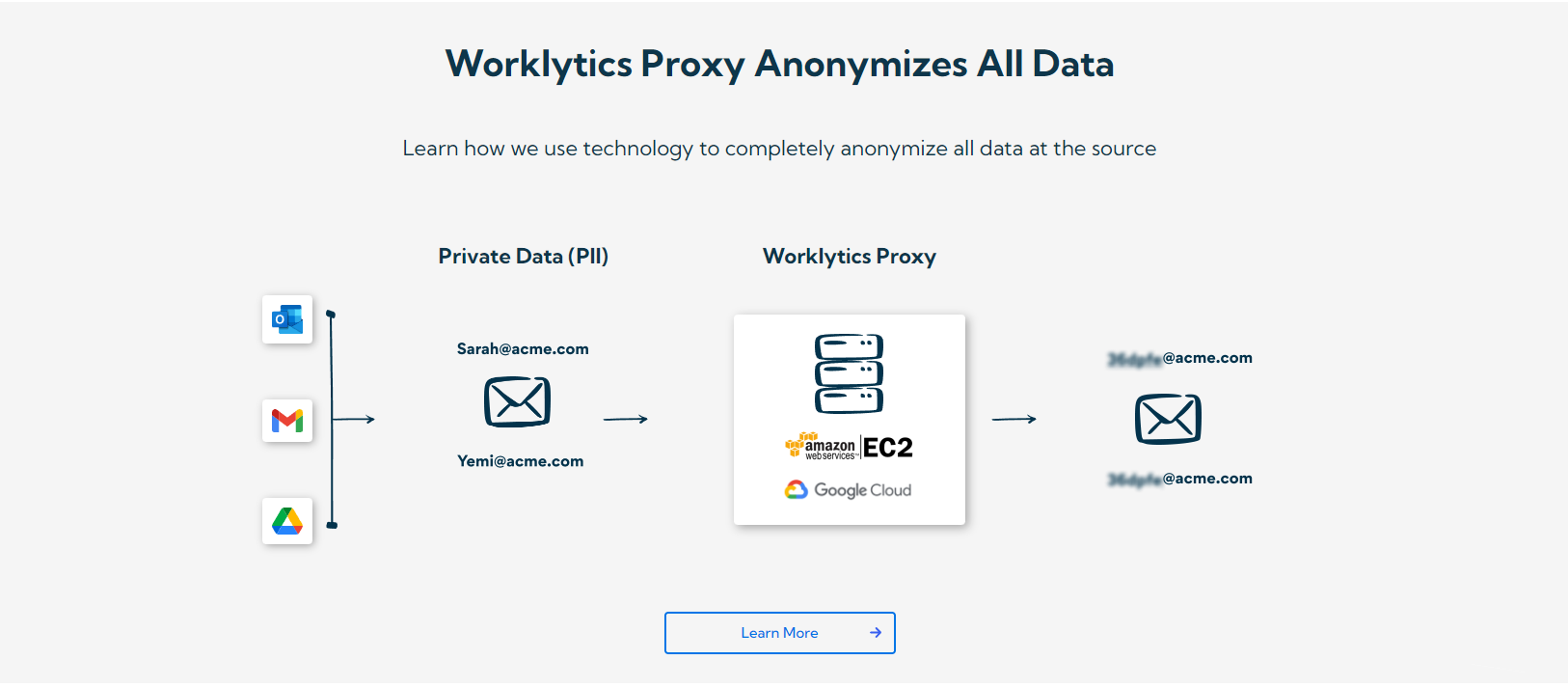
Worklytics is privacy-first. Personal identifiers are pseudonymized (hashed with SHA-256) before analysis, no message content is read, and results are only shown for groups above a minimum size (typically 5 to 8 people). The focus stays on team patterns, not personal behavior.
Silos form when teams collaborate well internally but rarely across functions. Cross-group and within-group collaboration metrics show where connections between teams are weak, so leaders can strengthen them deliberately. This matters more as AI makes individuals more self-sufficient.
Because the data is collected every week, you can track how collaboration changes as AI tools roll out: less meeting time, shorter pull request review cycles, more focus time, or early signs of burnout such as more after-hours work. That lets you act early, whether with training, changes to how a tool is used, or new team norms.
Not automatically. Field experiments show AI mainly makes individuals more capable: at Procter & Gamble, one person with AI matched a two-person team without it, and developers with GitHub Copilot shifted toward more independent work. Collaboration improves only when teams change how they work together.
For some tasks, yes. Individuals with AI can now do work that used to need a partner, and coding assistants shift time away from project management. Complex work across functions still needs people working together, so the goal is to use the time AI saves for better collaboration rather than less.
It can. In the Procter & Gamble experiment, people using AI produced more balanced solutions that combined technical and commercial thinking, regardless of their own function. Whether that leads to more contact between teams is something to measure with cross-group collaboration data.
Track AI use and collaboration for the same teams over the same weeks. Useful pairs are AI workflow penetration against cross-group collaborators, and AI days used against focus hours and collaborative work hours. Worklytics reports these from work-tool metadata at the group level.
Yes. Worklytics uses metadata from work tools and AI admin APIs, never message content, pseudonymizes personal identifiers before analysis, and only shows results for groups above a minimum size. Leaders see team patterns, not individual behavior.
AI tools can improve collaboration, but they do not do it on their own. The best evidence so far shows AI making individuals faster and more self-sufficient, helping people work across functional silos, and cutting time spent on email. Whether that turns into better teamwork depends on how organizations change the way teams work.
Measure it rather than assume it. Track AI use and collaboration for the same teams over time, and use what you learn to keep creativity, judgment and human connection at the center while AI handles routine work. Ready to see how AI is changing collaboration in your organization? See how Worklytics measures AI adoption and its impact.